

When most business owners think about FAQ sections, they’re thinking about convenience. Something to save time and answer functional questions like “what’s your turnaround time?” or “do you offer payment plans?”
But what if I told you your FAQs aren’t just there to help your clients, and they’re one of the most underrated SEO tools on your website?
In 2025, FAQs are a powerhouse for visibility and conversion. They’re how you start showing up on Google, how you get cited in AI-generated answers, and how you turn casual browsers into confident buyers.
In this post, we’ll break down how to use FAQs for SEO (and client experience) in a way that’s strategic, simple, and totally doable.
What is a FAQ page (and where should it go?)
Let’s start with the basics: an FAQ (Frequently Asked Questions) section is exactly what it sounds like: a collection of your most commonly asked questions, paired with clear, helpful answers.
For service-based businesses, your FAQ can live in a few different places:
- A dedicated FAQ page that covers broad questions about your business, services, or policies.
- Embedded FAQ sections on key service or sales pages to answer offer-specific questions right where they matter most.
In either case, these Q&As serve a dual purpose: they make life easier for your clients and they help search engines understand your content.
A well-written, well-placed FAQ section can:
- Add clarity to complex services or processes
- Ease decision-making for your potential clients
- Give Google and AI search tools more context about your offer and who it’s for
Are FAQ pages good for SEO?
If you’ve ever wondered “are FAQs good for SEO?” the answer is a BIG yes, especially now, when search engines (and AI tools) are prioritizing content that directly answers user questions. Here’s why:
They naturally capture long-tail keywords
When you write your FAQ in your client’s voice (using the same words and phrases they do), you’re automatically tapping into long-tail search traffic. These are highly specific queries like:
- “Do interior designers offer virtual consultations?”
- “Is Greece or Italy better for a honeymoon?”
- “What does full-service trip planning include?”
Search engines love these types of questions because they’re specific, intent-driven, and helpful. (They’re also great for blog posts!)
They increase time on page and lower bounce rates
When someone lands on your page and immediately sees their question answered? They stay longer. They explore more. They’re more likely to trust you. That sends good signals to Google — and keeps your site rising in the ranks.
They help you show up in featured snippets and AI results
Ever notice those little drop-down answers at the top of Google search results? Or the way tools like ChatGPT pull direct answers into AI-generated responses? Those often come from well-structured FAQ content. If your questions are clear, your answers concise, and your markup is done right (more on that in a bit), you’re much more likely to show up in those spots.
They give Google a better understanding of your website
Every time you answer a common question, you’re adding valuable context to your site. That helps search engines understand what you do, who you serve, and how your services solve real problems, which improves your visibility in relevant search results.
Why FAQs matter for client experience
While FAQs are undeniably powerful for SEO, their real magic lies in how they serve your audience. Because here’s the truth: content that helps your readers also helps you rank. When your website becomes a resource, you build trust, credibility, and connection.
Build trust through transparency
When you proactively answer questions your clients are already thinking about, it shows that you get them. You’re not hiding the ball on pricing, process, or what’s included, and that openness builds trust before a single discovery call.
Examples:
- Interior designers might include: “Do you offer design-only services without purchasing?”
- Travel agents might include: “What happens if my trip gets canceled?”
Shorten the sales cycle
You know those emails that start with: “Quick question before I book…”? A great FAQ section answers those ahead of time, helping clients move from curious to confident faster. That means fewer back-and-forth emails and more high-intent inquiries landing in your inbox.
Turn confusion into confidence
For service-based businesses, especially in niche industries, clarity is currency. Explaining things like your booking process, timelines, deliverables, or what “white-glove service” actually means helps clients feel more prepared and at ease. And a confident client is a ready client.
Tips for creating high-converting FAQ
Not all FAQs are created equal. To have great FAQ pages for SEO and your clients, you’ll want to be intentional about what you include and how you present it. Here’s how we recommend approaching your FAQ strategy:
Use real client questions
The best source for your FAQ section? Your inbox, DMs, and discovery calls. If you’ve answered it more than once, it belongs on the page. Don’t just guess; use language your audience actually uses.
Example
- Instead of: “What is your design process?”
- Try: “How involved will I need to be during the design phase?”
Format for scanners and skimmers
Most readers don’t read every word. They’re skimming! Help them out with short, direct answers and collapsible sections that make it easy to find what they’re looking for
Link to deeper content
FAQs for SEO are the perfect gateway to more helpful content. If a question deserves a fuller explanation, link to your blog post, service page, or even a freebie that dives deeper.
Example
- “What’s the best time to visit Italy?” → Link to a blog called The Best Time to Travel to Italy by Season
Update your FAQ regularly
Search engines (and clients!) love fresh content. Check your FAQ every quarter and update based on:
- New services or offers
- Seasonal trends
- Client questions that keep popping up
Make it page-specific
Instead of one massive FAQ page for SEO, consider placing smaller, relevant FAQs on each service page. For example:
- Interior designers: Add questions like “Do you source furniture locally?” on your Full-Service Design page.
- Travel agents: On your Honeymoon Planning page, answer “Can you help us plan a surprise trip?”
Where do FAQ pages for SEO go?
There’s no one-size-fits-all approach when it comes to placing FAQs on your site, but where you put them does matter for both SEO and user experience. Here’s what we recommend.
1. On service pages
Instead of sending people to a separate FAQ page, consider weaving relevant questions right into your service pages. This helps keep visitors engaged on the page they’re already interested in—and it reinforces the keywords you’re targeting for that particular offer.
Examples
- Interior Designers: On your virtual design or full-service page, include FAQs like:
- “How long does a typical project take?”
- “Do you offer virtual design services?”
- Travel Agents: On your Disney vacation planning page, you could answer:
- “Is Genie+ worth it for families?”
- “What’s the best age for a first Disney trip?”

2. On sales pages
Have a signature offer, course, or service package? An FAQ section near the bottom of your sales page can overcome objections, clarify the details, and help hesitant buyers feel more confident about clicking “Book Now.”
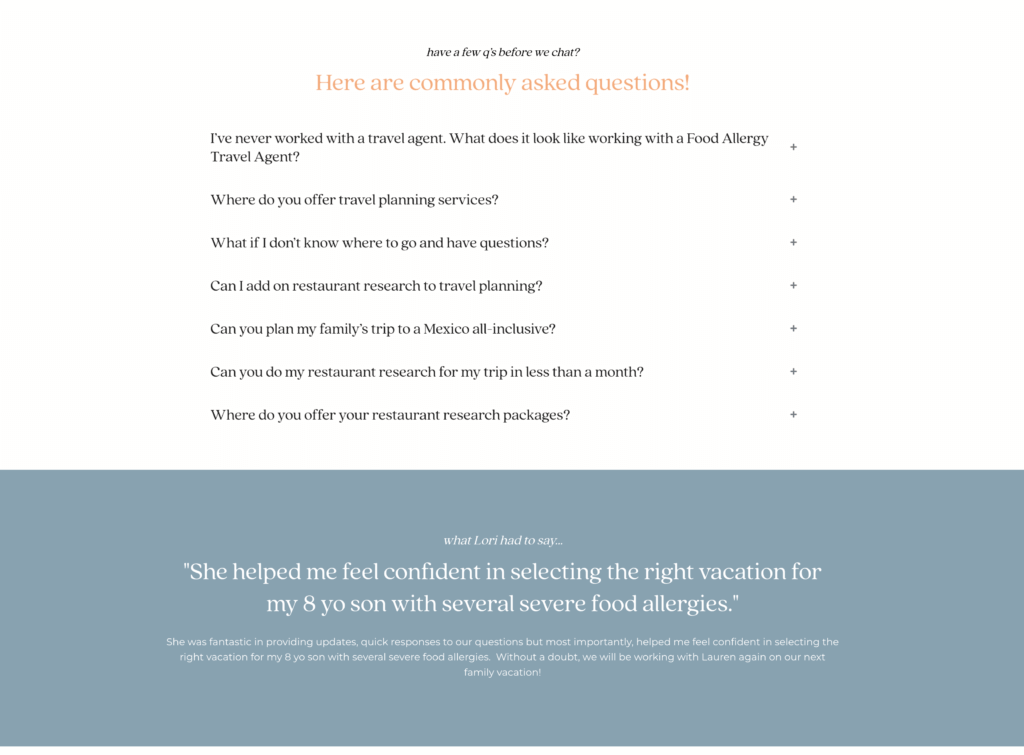
3. On a dedicated FAQ Page
If your clients ask a wide range of questions—or you want a hub that addresses everything from policies to process to pricing—creating a standalone FAQ page is a great option. It gives Google a clear, keyword-rich page to crawl and gives your clients a go-to resource.
Just make sure to organize it by category (e.g., services, process, timeline, pricing) and include internal links back to relevant service or blog pages.
What is FAQ schema for SEO?
FAQ schema is a type of structured data markup that helps search engines understand that a section of your page contains questions and answers. When done correctly, it makes your content eligible for rich snippets (those expanded listings on Google that show the actual questions and answers directly on the search results page.)
How to add FAQ schema
For WordPress users, it’s easy to add schema with a plugin like RankMath. Usually, it will pick up the correct schema for a FAQ section as you create it, but you’ll need to validate the markup to be sure you’ve gotten everything right (read all about how to do it here!)
FAQs for SEO do so much more than answer questions!
When you treat FAQs like the strategic asset they are, you unlock serious SEO potential and create a smoother, more confidence-boosting experience for your future clients.
Whether you’re answering “Do I really need a travel agent in 2025?” or “What’s included in your full-service design package?”, those are the exact questions your next client is likely typing into Google right now.
So let your website be the one that shows up, shows out, and gets the click.
Want help taking your SEO game from good to great?
Book an SEO Strategy Session to get clear on what your audience is searching for and how to turn those search terms into traffic, connection, and conversion.